
Home / Buying guide
Mulebuy buying guide: the order and the records it leaves
Follow the purchase from a saved seller link to a tracked parcel, and keep the small set of records needed to resolve a mistake. The historical Mulebuy screens below explain the stages; they do not confirm that the service currently accepts orders.
Illustrated archive: these screens document Mulebuy’s earlier buying flow. They do not confirm current operation, prices, return terms or route availability. Verify the service and its terms before sending money or identity documents.
1. Find the original seller link
Search for the product or paste its seller URL into the agent search field. Keep the original Taobao, Tmall or Weidian link with your notes: an agent-wrapped link or a screenshot alone may not identify the exact listing. If a link fails to import, ask the verified support channel whether manual ordering is available instead of selecting a similar-looking item.
Save the product URL without adding your address or account number to a shared note. Product research and the later delivery record serve different purposes.
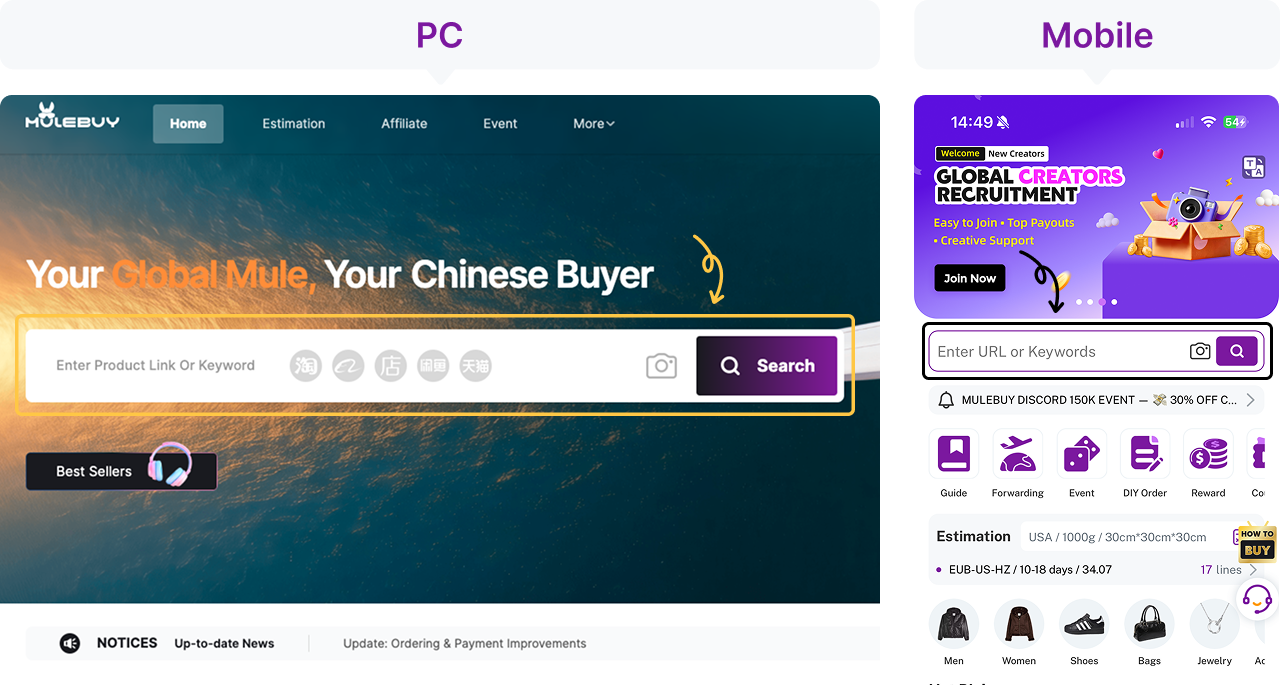
2. Choose the exact variant and make the first payment
Check colour, size, quantity, measurements and seller notes before adding the item to the cart. Review the order quote for goods, domestic delivery and any disclosed service charges. A wallet top-up is not necessarily an order payment; confirm the order itself shows the expected status. International parcel freight is a later decision.
Keep the selected variant and the payment receipt together, with sensitive payment details stored privately. A balance entry alone may not identify the order you intended to pay.
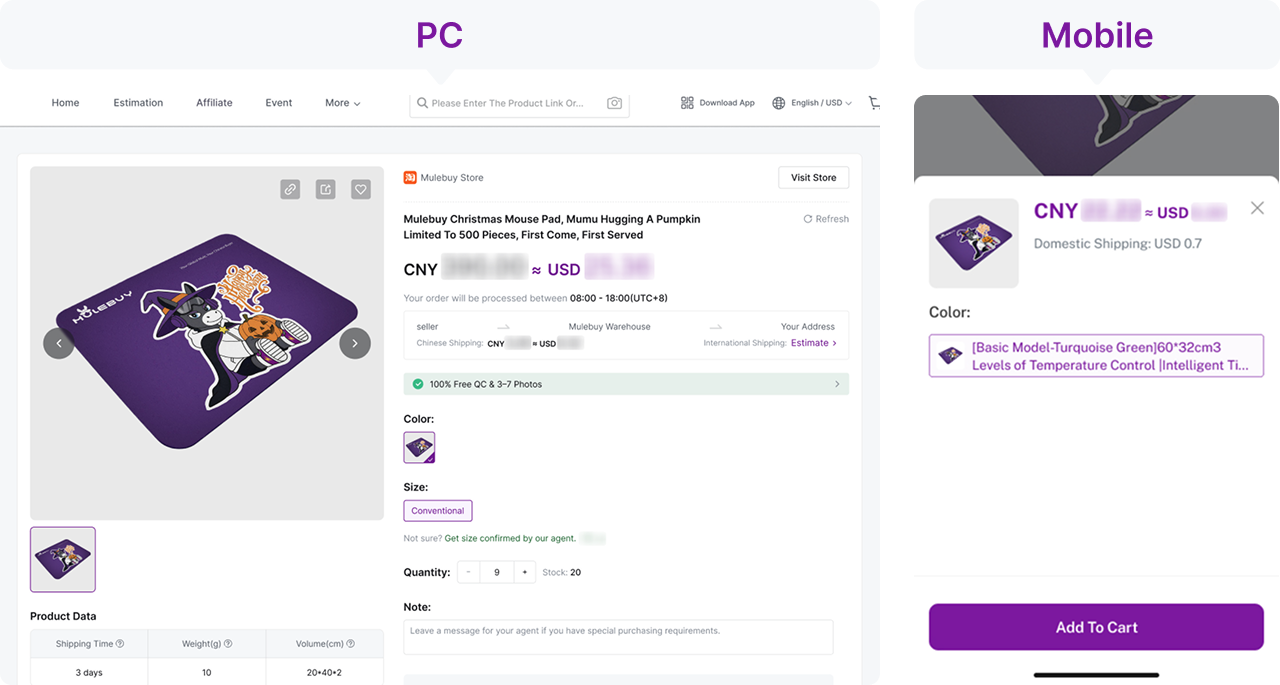
3. Follow the purchase and domestic delivery
Open the order record and distinguish waiting for payment, agent purchasing, seller dispatch and warehouse arrival. Reply promptly if the agent requests a price difference or a missing option. Domestic tracking follows the seller-to-warehouse leg; it is not proof that the international parcel has shipped. Save the order identifier when asking for help.
Use the affected order identifier when contacting support. A screenshot of your entire account can expose unrelated purchases and personal details without helping resolve the issue.
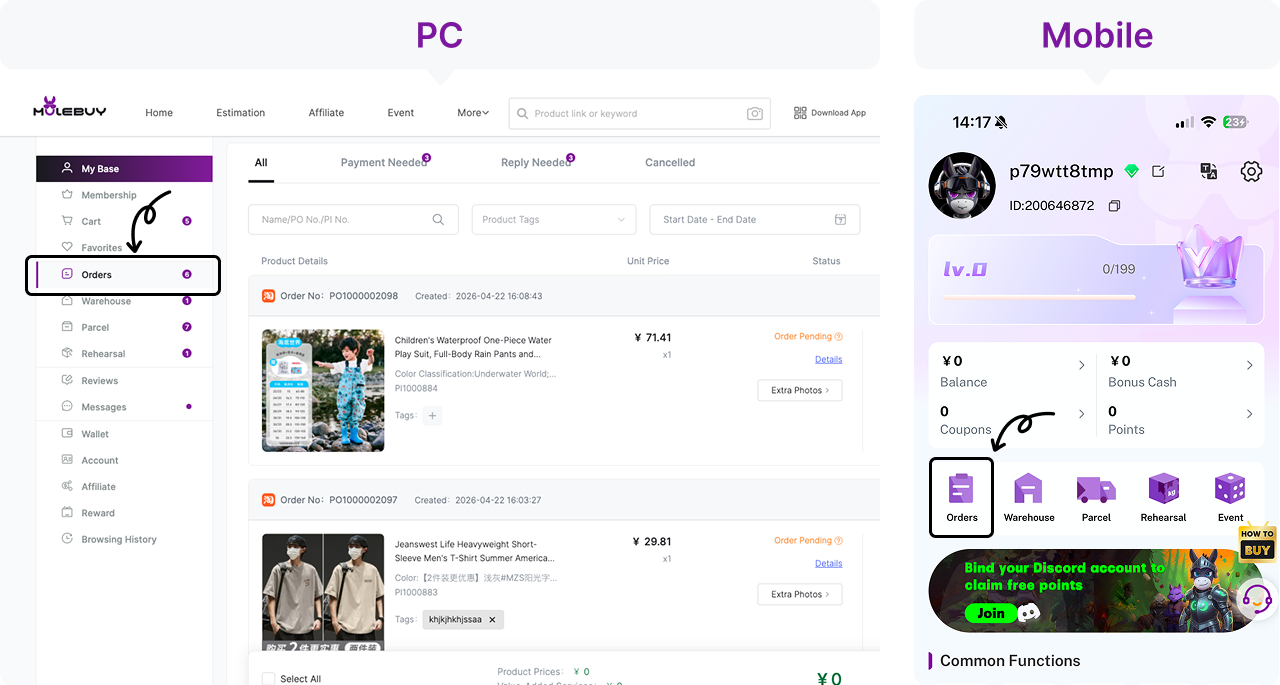
4. Inspect warehouse QC before deciding to ship
Compare the received item with your saved variant, then open the full-size photos. Check visible colour, labels, measurements, print and damage relevant to the purchase. Request a specific additional angle or ruler measurement when the default photos cannot answer your question. QC photographs are visual evidence, not authentication, a laboratory test or proof of durability. Ask about seller return conditions before the applicable deadline.
Save the relevant original photo privately, then redact your name, account identifiers and address from any copy you post publicly. Redaction should not obscure the item difference you need someone to assess.
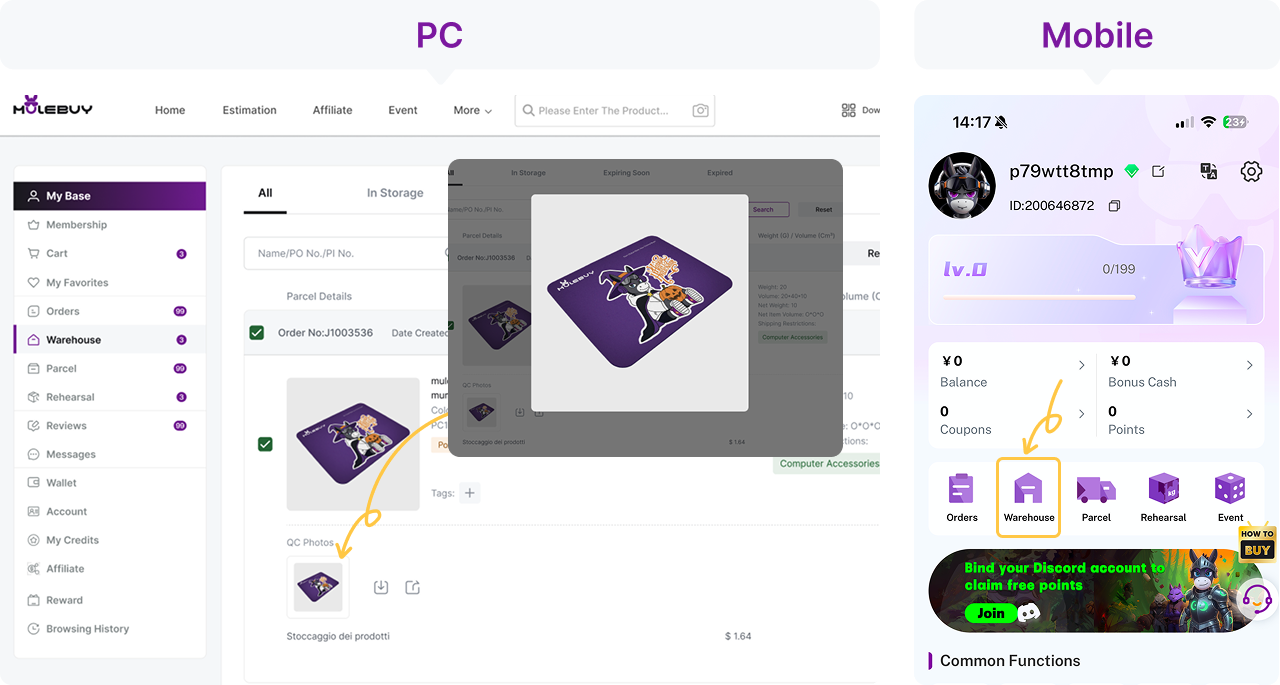
5. Build the parcel and review international freight
Select eligible warehouse items, destination and packing preferences. Rehearsal or pre-calculation may help establish packed dimensions and weight where offered. Compare the available route, chargeable weight, restrictions, selected services and any applicable import costs before paying. Keep protective packaging that the product needs; a lighter parcel is not useful if it arrives damaged.
Check the recipient and delivery address in the private parcel record. If another person will receive it, confirm their details with them instead of copying an old order without checking.
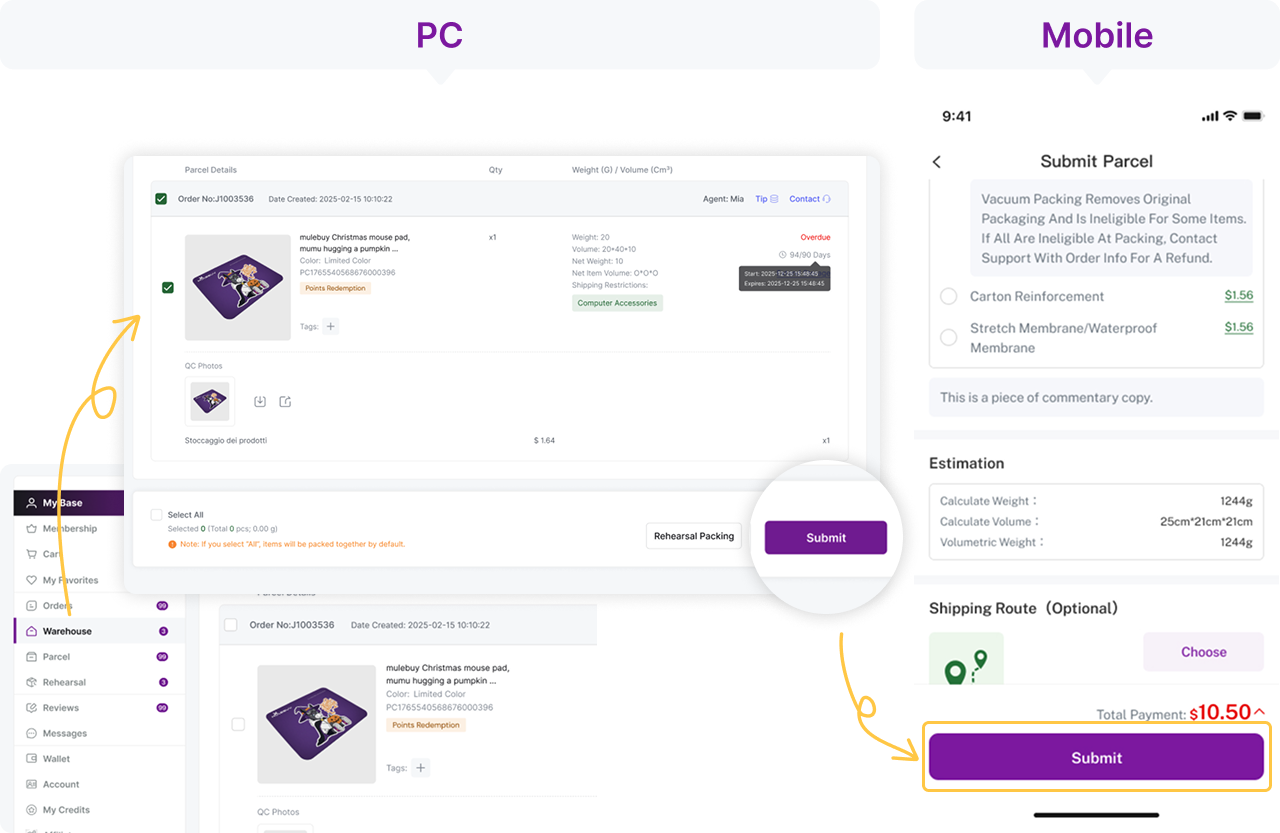
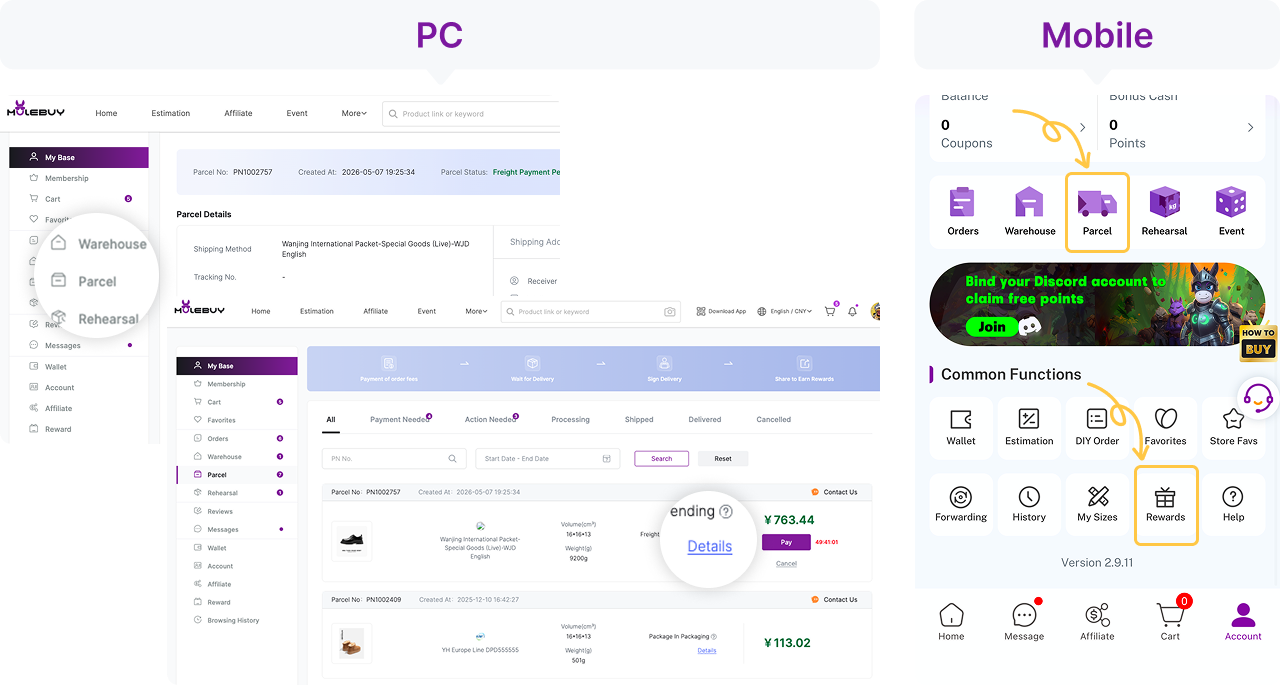
6. Track the parcel from its own record
Open the parcel details after submitting it and confirm freight payment and dispatch status. Save the international tracking number and check the carrier events. A parcel record can exist before it is paid or handed to the carrier. If there is a problem, provide the parcel identifier and relevant event to the support channel responsible for that stage.
Keep the parcel identifier and the support conversation for a delivery dispute. A request for personal data does not replace a missing-parcel claim or automatically suspend its deadline.
Worked example: a wrong-size item and the evidence to keep
Record the seller link and the variant you selected before checkout. If the warehouse photograph shows a different size label, save that photo with the order identifier and ask the agent to compare it with the purchase record. Keep the conversation and the seller's response until the issue is resolved. An access request is a separate process from asking for an exchange or refund: it does not automatically pause a seller's return window. Share only the affected order with support, and redact account details before showing a screenshot publicly.
- Have you saved the exact variant and order identifier?
- Does the receipt distinguish an order payment from a wallet top-up?
- Are address and phone details hidden in public screenshots?
- Are you contacting the seller, agent or carrier for the part they control?
Two payments and a quote to check at each stage
The first payment concerns the goods, domestic delivery and any disclosed services. The later parcel payment concerns international freight and selected packing or other services. A wallet top-up, an order payment and a parcel payment are different records: check which one you completed.
Chargeable weight can depend on actual weight or parcel volume under the selected route’s rules. An early estimate is not a guaranteed final quote. Check current restrictions, insurance terms, warehouse storage conditions and return or exchange deadlines; do not infer them from the figures in these old screens.
Practical questions
Does this site need my Mulebuy login?
No. These guides and the request drafter do not need your agent password. Enter account credentials only on a service you have independently verified, never in a public message or a request draft shared with strangers.
Does asking for my data also cancel an order?
No. A data request and a cancellation or return are separate requests. Contact the relevant support channel about the order and keep any applicable deadline in view.
Which record helps with a delivery problem?
Start with the parcel identifier, tracking number, dispatch status and delivery address shown in your private account. A domestic seller tracking number is not necessarily the international parcel number. Share sensitive details only through the appropriate support channel.
Decision points for the whole order
Keep an order record before making a data request
For an existing purchase, first save the order ID, seller URL, selected size and colour, payment confirmation and current status. A privacy request can help establish what personal data a business holds; it does not complete a purchase, recover a payment or suspend an order deadline. Keep the shopping problem and the data request clearly identified in your notes.
For a new purchase, check whether you can reach the service and a support route before depositing money. Our public requests to Mulebuy’s home and fee page timed out on 22 October 2026. This records an access failure, not its cause or permanent closure. If an old product link no longer imports, obtain the original marketplace URL and a quote for the exact variant. A screenshot containing your account name is not proof that today’s checkout works.
Reconcile the payment record without exposing it publicly
Create a private list of amounts: seller price in CNY, domestic freight, wallet top-up, goods debit, later parcel debit and final card or bank debit. Goods and international transport are separate stages; optional photos, packing, insurance or arrival charges may create additional entries. Record which amounts are estimates and which have actually been charged.
Illustrative reconciliation: goods and domestic delivery total CNY 250; the parcel later costs 170. The purchase subtotal is 420 CNY, before excluded payment, conversion or arrival costs. A £ debit cannot be compared with that subtotal until you check which wallet credit it funded and the applied conversion. Neither these numbers nor a public exchange calculator is a live quote.
If a payment appears twice, compare transaction references and wallet history before trying again. Ask support to identify each entry and any reversal. A useful evidence copy shows date, currency, amount and relevant reference while hiding full card numbers and unrelated transactions. Keep the unredacted original for the verified provider handling the case.
Separate an order instruction from a request for account data
A “reply needed” order may be waiting for a price-difference decision, stock choice or other instruction. Quote the order ID and ask what action is required; a subject-access request sent to a privacy contact is not that instruction. If the seller offers another size, compare the saved chart and ask for the revised total before approving it.
Follow the sequence paid → purchased → seller dispatched → warehouse matched → QC available using the records actually shown. If domestic tracking says delivered but there is no warehouse item, give order and tracking IDs privately to support. If the seller has not shipped, ask for cancellation options in that state. Preserve the answer and date rather than assuming a status label promises a deadline.
Keep the measurement evidence and remove personal data from public copies
For a wrong-size garment, retain the chosen size chart and request a readable label plus the relevant centimetre measurement on the received piece. Ask for both tape endpoints and the method used, such as flat chest width rather than circumference. If the image does not answer that question, request a retake before deciding to ship.
The original warehouse image may contain order identifiers or other account information. Keep it privately with the date and item ID. For a public sizing question, crop only the copy and mask addresses, barcodes and payment references; do not destroy the original measurement context. GL or RL from another reader is an opinion, not an authenticated order finding or an instruction recorded with the agent.
Historical August help limited QC to visible checks and described paid extra views. Ask for current terms before ordering more photos. Neither a label nor a clear image verifies composition, safety or authenticity. When a decisive question remains unanswered, put the shipping decision on hold and check the return window rather than seeking stronger wording from commenters.
A refund request and an erasure request have different consequences
Describe the purchase remedy first: cancellation before buying, return of a warehouse item, a missing wallet credit, or withdrawal of an existing balance. Use the saved variant, Stored timestamp and specific mismatch. Asking for account erasure while a dispute is unresolved does not itself return the goods or stop the relevant shopping deadline. Preserve the records you need before making decisions about account data.
The archived August return page linked its five-day / 120-hour warehouse window to Stored and seller acceptance, with resale and exclusion conditions. It also contained a separate UK delivery clause. Those texts do not establish which present consumer-law rights or merchant terms apply to your particular transaction. Confirm the responsible business, the applicable process and the deadline rather than adding the historical clauses together.
Ask about return freight, service deductions and the destination of any refund; the historical personal-reason charge was USD 0.75 alongside relevant freight. “Refunded” may mean wallet credit, not money back at your bank. Record return acceptance, wallet entry and original-method withdrawal separately. For an unresolved payment problem, contact your payment provider through its verified channel about its own process and limits; a privacy complaint is not a substitute for that route.
Check the recipient details and route before paying parcel freight
Compare the parcel’s recipient name, house or flat number and postcode with the delivery address you intended. If a correction is needed, ask whether the label has been produced or the parcel handed over, and obtain confirmation of what can still be changed. Never post the full address label publicly to ask for route advice.
Check the line’s UK destination coverage, item restrictions, dimensions, compensation and any separately collected arrival charges. If there is no eligible line, ask which item or measurement causes the refusal; changing the description does not make prohibited goods eligible. The warehouse’s weight estimate may differ from the packed result because volumetric charging and rounding depend on the line. Keep the final scale weight, dimensions and charge in the private parcel record.
For items waiting during a dispute, record each item’s remaining storage time. The August terms described 90 free days from Stored and extension conditions; an access request does not extend that clock. Ask for a specific extension confirmation and its cost. A historical Overdue status is not evidence that the contents of your account remain available.
Build a dated timeline for the particular missing event
A parcel entry, freight debit, warehouse dispatch statement and carrier collection scan are different pieces of the timeline. “Label created” shows that a label exists; it does not by itself establish possession by the carrier. If systems disagree, save both timestamps and request the collection event or final-mile number instead of choosing the more reassuring label.
For an order complaint, send only the records needed to establish the mismatch: item or parcel ID, chosen variant or line, last event and the remedy requested. For a data request, specify the categories or period of data being sought. Use the verified contact appropriate to each request and record when it was sent. Avoid attaching identity documents to an unverified chat merely because it claims to be support.
After delivery, preserve the packaging and take clear photos of damage or a wrong item while the context is available. A useful order message is: “Parcel [ID], carrier [name], last scan [time]. The label records [redacted address difference]. Please confirm whether correction is possible, the next event and the deadline.” Original files stay private; copies for outside advice should disclose only what is necessary.
A wrong-size garment and its private record
Keep the selected size, centimetre chart, order identifier and full QC measurement privately. Ask support to compare the received label and ruler measurement with that record, and request the remedy before the applicable return deadline. A data-access or erasure request does not pause an order dispute or the seller’s return window. Remove addresses, payment references and barcodes from any public screenshot.
Historical sources and the current access limit
The policy detail above comes from official pages archived on 23 August 2026. These links identify the original pages; they may be unavailable. The six interface images are historical documentation, not our order, a current price list or proof of a successful shipment.
- Buying Guide — 2026-08-23
- Quality Check — 2026-08-23
- Services Fee — 2026-08-23
- Return & Refund — 2026-08-23
- Top-up & Withdrawal — 2026-08-23
- Weight Description — 2026-08-23
- Storage Management — 2026-08-23
- Shipping — 2026-08-23